
Imagine setting a dehumidifier to 50% relative humidity (RH). Later, its display reads 53%RH and the machine is quiet. You come back that afternoon, see 53%RH again, and hear water dripping into the bucket. Both observations can fit the same settings. To understand dehumidifier control, it helps to know where the humidity reading comes from, which threshold the air last crossed, and whether the machine is ready to run.
How Does a Dehumidifier Know When to Run?
In automatic mode, a humidity sensor measures the air at a particular point. A controller compares that reading with its settings and calls for dehumidification when the start condition is met. On a portable compressor model, a fan draws air across a cold coil. Water condenses on the coil and drains into a bucket or through a hose. As the treated air mixes with the room air, the sensor takes new readings. When the stop condition is met, the controller ends the call. That feedback is what lets the unit respond to a door opening or a new load of damp materials.
The control that responds to humidity is often called a humidistat. A portable unit can house the sensor, humidistat and moisture-removal equipment together. One small display may therefore do two jobs. For example, GE describes portable models that show the requested humidity while you adjust the controls, then return to the measured room humidity. If you enter 50% and the number jumps back to 61%, 61% can be the current reading while 50% remains the stored target. Selecting continuous-run mode on an equipped unit allows drying to continue past the usual humidity target.
Why Do Dehumidifiers Have Different Start and Stop Thresholds?
If a unit switched every time the reading moved a fraction above or below one number, small fluctuations could trigger repeated starts and stops. An on/off humidistat can avoid that by using two thresholds. The gap between them is the switching differential. Within that gap, the output keeps its previous state. This behavior is called hysteresis.
Suppose a controller uses 50%RH as its stop point and has a differential of five percentage points. Starting from rest at 50%RH, it stays off as humidity rises through 53%RH. At 55%RH it calls for drying. On the way back down, the reading passes through 53%RH again, but this time the call stays active until 50%RH. This illustrates the setpoint-plus-differential convention in the INKBIRD IHC-200 manual. On another controller, the menu may specify the start and stop values separately. Check how the manual defines the displayed setpoint before using it to predict a switch.
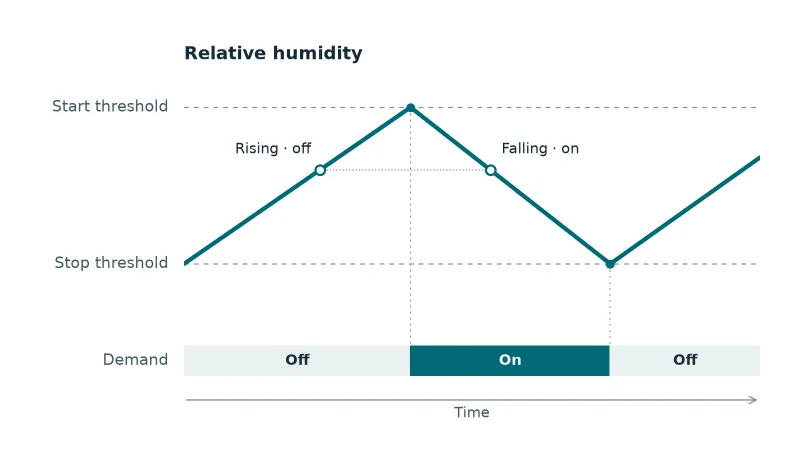
A wider differential lets humidity travel farther before the next switch. The time that takes depends on how quickly moisture enters the space and how quickly the unit can remove it. A restart delay adds a time limit. Even after humidity crosses the start threshold, the equipment may have to wait for that timer to expire.
When Do You Need an External Humidity Control?
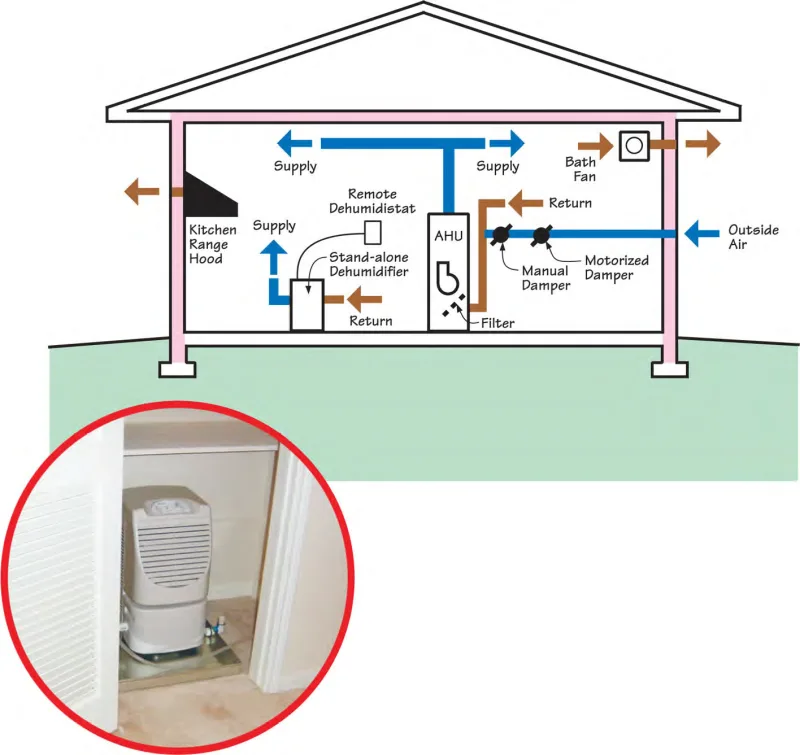
Start with the space you want to keep dry. A portable dehumidifier in one room can use its inlet sensor if the room air circulates past it. In an electrical cabinet with a separate humidity controller, the sensor measures the cabinet air. When humidity reaches the start threshold, the controller switches a relay contact to request drying. The connected dehumidifier removes moisture from the air. In a ducted system, however, the machine might sit in a basement while the stored goods or occupied rooms are elsewhere. An external humidistat can be useful when that other space should determine the demand. The ductwork must also carry air between the equipment and the space you intend to dry.
The AprilAire installation guide (PDF, p. 12) shows two ways to use its Model 76 wall control. In external-control mode, the sensor in the wall panel measures the humidity of that room. In remote-control mode, the panel displays the reading from the dehumidifier’s own sensor and lets you adjust the setting from the wall. If the basement reading looks right but an upstairs room stays damp, check which sensor the installer selected. A panel upstairs can still be reporting basement humidity.
Why Can Humidity Be High While the Dehumidifier Is Idle?
First, establish which reading is high. If a separate humidity meter disagrees with the built-in display, place it near the active sensor and give both readings time to settle. A cooler corner can show higher RH than warmer air elsewhere even when both contain the same amount of water vapor. Then check the operating mode, the start threshold and any indicated restart delay. A reading inside the switching band is consistent with a unit still waiting for its next call.
If the start condition has been met, look at the equipment status. On the portable units described in GE’s dehumidifier manual, a full or incorrectly seated bucket stops operation. During automatic defrost, the compressor pauses while the fan keeps running until frost clears from the coil. If the display flashes “Empty,” check the bucket and its seating. If the unit is defrosting, allow that cycle to finish before judging whether the humidity control is responding.
Return to the 53%RH example. A note that says “53%RH, rising from 50%, unit idle” tells you more than a photo of the display. Add the active sensor’s location and any status indicator, and you can tell whether the controller is still waiting for its start threshold or whether the equipment has a reason to pause.